A customer in Camden searches for an accountant. Someone near Canary Wharf needs an emergency plumber. A family in Richmond looks for a private dentist.
In each case, Google must decide which nearby businesses deserve to appear in the map results and organic listings. If your business information is incomplete, your website lacks local relevance or your competitors have stronger reviews and local authority, you may not appear at all.
This local SEO checklist London businesses can follow in 2026 explains how to improve your visibility across Google Search and Google Maps without relying on shortcuts, fake reviews or dozens of copied location pages.
It covers:
- Google Business Profile optimisation
- London keyword and service-area targeting
- Location and service pages
- Reviews and local citations
- Local backlinks
- Technical SEO and mobile performance
- Structured data
- AI search optimisation
- Local SEO measurement
Google says local search results are mainly influenced by relevance, distance and prominence. You cannot control where every customer is standing, but you can improve how clearly Google understands your services, location and reputation through Google’s official local ranking guidance.
Local SEO Checklist for London Businesses
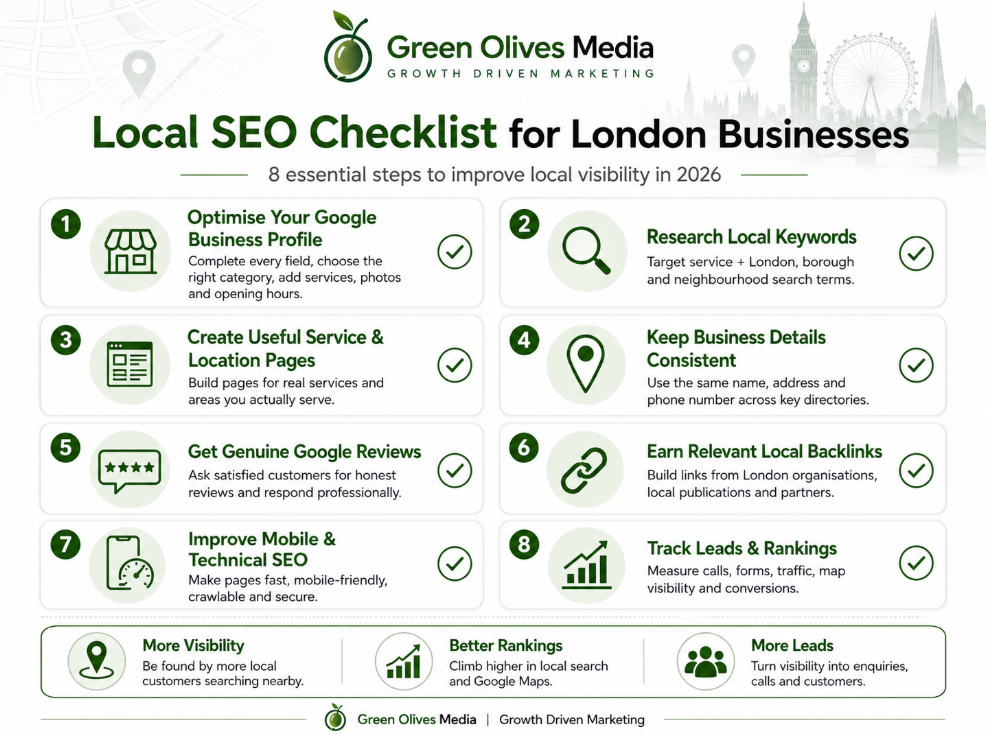
Use this checklist as a starting point:
- Claim and verify your Google Business Profile
- Select the most accurate primary business category
- Add your real address or eligible service areas
- Keep your name, address and phone number consistent
- Add services, opening hours, photos and contact details
- Research service-and-location search terms
- Create genuinely useful service and location pages
- Optimise page titles, headings and internal links
- Ask customers for genuine Google reviews
- Build accurate business citations
- Earn links from relevant London organisations
- Add appropriate structured data
- Improve mobile usability and Core Web Vitals
- Track calls, forms, rankings and Google Business Profile actions
- Update your local information whenever anything changes
Completing the checklist once is not enough. Local SEO works best when business information, reviews, website content and local authority are maintained consistently.
What Is Local SEO?
Local SEO is the process of improving a business’s visibility for searches connected to a place.
These searches may contain an obvious location:
- Accountant in Hackney
- Solicitor near Liverpool Street
- Dentist in Croydon
- Web designer in Greenwich
They can also have local intent without mentioning London:
- Accountant near me
- Emergency plumber open now
- Best dental clinic nearby
- Marketing agency near me
Google may use the searcher’s location, the words used in the query and information about nearby businesses to produce local results.
Local SEO can therefore influence two important areas:
- Google Maps and the local pack, where Business Profile listings appear.
- Local organic results, where service pages, location pages and useful guides appear.
A strong strategy works on both. Optimising a Google Business Profile while ignoring the website can limit organic visibility. Improving the website without maintaining a Business Profile can make it difficult to compete in map-based results.
1. Decide Which Parts of London You Actually Serve
London is too broad to treat as one simple search market. A business serving customers in Enfield may face different competitors and search patterns from a business operating around Westminster or Lewisham.
Begin by identifying:
- Where your business is physically located
- Which boroughs and neighbourhoods you regularly serve
- How far customers will realistically travel
- How far your team can travel profitably
- Which services are available in each area
- Whether customers visit you or you travel to them
Do not claim to serve every part of London simply because you would accept an enquiry from anywhere.
A clearer target might be:
We provide commercial cleaning throughout South London, with regular teams operating in Croydon, Sutton, Bromley and nearby areas.
This gives your customers and search engines more useful information than repeatedly stating that you cover “London and the surrounding areas”.
Can a home-based or service-area business use local SEO?
Yes. Plumbers, cleaners, mobile technicians, tradespeople and other businesses that visit customers can use a service-area Google Business Profile.
Businesses that do not receive customers at their address should hide that address and configure eligible service areas instead. Google provides separate service-area business guidance.
Never use a false address simply to appear closer to a valuable part of London. Business information should represent how the company operates in the real world.
2. Research Local Keywords by Service and Area
Local keyword research should connect a service with the way customers describe a location.
Useful patterns include:
- Service + London
- Service + borough
- Service + neighbourhood
- Service + postcode area
- Service + near me
- Best + service + location
- Emergency + service + location
- Service + open now
- Service + cost + location
For a London accountancy firm, relevant searches might include:
- Small business accountant London
- Accountant in Islington
- Tax accountant Canary Wharf
- Accountant near King’s Cross
- Bookkeeping services East London
Do not create a separate page for every minor wording variation. Google’s language systems can understand closely related terms, so one comprehensive page can rank for multiple relevant searches. Google also advises site owners to use the words customers use in prominent places without trying to include every possible query variation.
Create a keyword map showing:
| Page | Main keyword | Supporting searches | Search intent |
|---|---|---|---|
| Local SEO service page | Local SEO London | London SEO agency, Google Maps SEO London | Commercial |
| Islington location page | Local SEO Islington | SEO company Islington, local SEO agency Islington | Local commercial |
| Checklist article | Local SEO checklist London | London local SEO checklist, how to rank locally in London | Informational |
This prevents several pages from competing for the same primary query.
3. Fully Optimise Your Google Business Profile
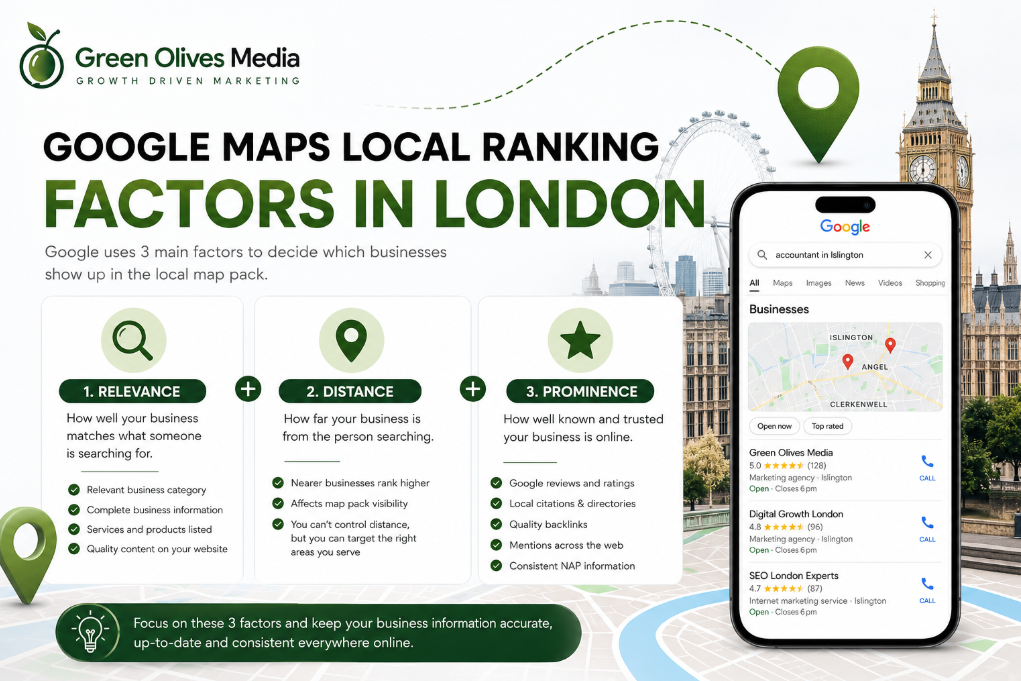
A complete and accurate Google Business Profile helps Google match your business with relevant local searches.
Claim and verify the profile
Make sure the profile is controlled by an authorised person within the business. Complete any verification process requested by Google and keep ownership details secure.
Use your genuine business name
Your Business Profile name should match the name customers see on your website, signage, invoices and business documents.
Do not add locations or services to the business name unless they are genuinely part of the registered or customer-facing name.
Choose the right primary category
Your primary category should describe what the business is, rather than listing everything it offers.
For example:
- Dentist
- Accountant
- Plumber
- Estate agent
- Marketing agency
Add secondary categories only when they accurately represent other important parts of the business. Google recommends selecting the most specific primary category available.
Complete the important information
Check the following fields:
- Business address or service areas
- Telephone number
- Website
- Opening hours
- Special or holiday hours
- Business description
- Services
- Appointment or booking links
- Accessibility information
- Relevant attributes
The landing page linked from the profile should match the location and service represented by the listing.
Add genuine photos
Upload clear, recent photos of your:
- Premises
- Team
- Completed work
- Products
- Treatment or consultation rooms
- Vehicles
- Shopfront
- Reception area
Photos help customers understand what to expect and can improve engagement with the listing. Avoid stock images that could belong to any business.
Use Google Posts sensibly
Posts can promote offers, events, announcements and new content. They may help customers engage with the listing, but they should not be presented as a guaranteed local ranking factor.
Use them to support conversions rather than posting solely because you expect an automatic ranking increase.
Track website visits from the profile
Add UTM parameters to your website URL so Google Analytics can distinguish Business Profile visits from other organic traffic.
For example:
?utm_source=google&utm_medium=organic&utm_campaign=google_business_profile
This helps you measure whether Business Profile visitors submit forms, call the business or view important service pages.
4. Create Strong Service and Location Pages
Your website needs a clear page for each important service.
A digital agency might have individual pages covering:
Service pages allow you to explain the offer properly instead of asking one general services page to rank for unrelated searches.
Should you create a page for every London borough?
Only create a location page when you can make it genuinely useful.
A valuable location page should contain more than a copied service description with a different borough inserted into the headings. Include information such as:
- Services available in that area
- Relevant local customer problems
- Genuine work completed nearby
- Testimonials from customers in the area
- Local travel or service information
- Areas and postcodes covered
- Response or appointment arrangements
- Team members serving that location
- Original photographs
- Clear contact and booking options
Avoid producing dozens of nearly identical pages for areas where you have no meaningful presence or supporting information. Google classifies pages created mainly to rank for similar queries and funnel visitors elsewhere as doorway abuse.
A business does not automatically need a separate page for all London boroughs. Start with the locations that generate revenue, enquiries or genuine customer demand.
5. Optimise Each Local Page Properly
Every service or location page should have one clear purpose.
Page title
Use the primary service and location naturally.
Example:
Local SEO Services in Islington | Green Olives Media
URL
Keep it short and descriptive:
/local-seo-islington/
Main heading
Use one clear H1:
Local SEO Services for Islington Businesses
Opening paragraph
Answer the visitor’s need immediately. Explain what you offer, where you offer it and who it is for.
Main content
Cover:
- What the service includes
- Which businesses it suits
- How your process works
- Relevant local challenges
- Evidence and experience
- Pricing or factors affecting cost
- Frequently asked questions
- The next step
Internal links
Link to useful supporting pages rather than repeatedly sending every visitor to the homepage.
For example:
- A business struggling with organic visibility can read why a website may not be ranking on Google.
- A company planning wider growth can review these effective marketing strategies.
- A dental clinic can use the dental marketing checklist for clinic owners.
- Businesses needing a faster or more conversion-focused website can explore web development services.
Internal links should help the reader continue their journey. Avoid adding unrelated links merely to increase the number of links on the page.
6. Keep Your Business Information Consistent
A local citation is an online reference to your business. It will often contain your:
- Business name
- Address
- Telephone number
- Website
- Opening hours
- Business category
Check your information across:
- Google Business Profile
- Bing Places
- Apple Business Connect
- Yell
- Yelp
- Companies House, where relevant
- Professional associations
- Trade directories
- Local chambers and business groups
- Sector-specific directories
The core information should describe the same real business everywhere.
Minor formatting differences are not automatically disastrous, but conflicting phone numbers, old addresses, duplicate profiles and outdated names can confuse customers and make your online presence less trustworthy.
Search for:
- Your company name
- Previous company names
- Your telephone number
- Your postcode
- Your old address
Correct important listings and request the removal or merging of inaccurate duplicates where possible.
7. Build a Consistent Google Review Process
Reviews can influence both visibility and customer confidence. Google states that review count and positive ratings may contribute to local prominence.
The goal should not be to collect a sudden batch of generic five-star reviews. Build a repeatable process for requesting honest feedback from genuine customers.
When should you request a review?
Good opportunities include:
- After a successful appointment
- Once a project has been delivered
- After resolving a support issue
- When a customer provides positive feedback
- Following a repeat purchase
- After confirming that the customer is satisfied
Send a direct review link by email, text message or WhatsApp to make the process simple.
Do not offer incentives
Do not offer discounts, gifts, competition entries or free products in exchange for Google reviews. Google considers incentivised reviews fake or misleading content and may restrict profiles involved in policy violations.
You should also avoid review gating, where only happy customers are directed to Google while unhappy customers are diverted elsewhere.
Respond to reviews properly
Reply to positive and negative reviews professionally.
A useful response can:
- Thank the customer
- Refer naturally to the service provided
- Address any concern without becoming defensive
- Protect private customer information
- Explain how the matter can be resolved
Do not force keywords into every response. Write for the customer reading it.
8. Earn Relevant Backlinks
Local links can help demonstrate that your business is connected to its market.
Possible sources include:
- London business publications
- Borough-level news websites
- Local chambers of commerce
- Professional associations
- Suppliers and business partners
- Community organisations
- Event websites
- Universities or training providers
- Local charities
- Industry publications
- Genuine local business directories
Practical link-building ideas include:
- Publish original London market research
- Contribute expert comments to journalists
- Support a local event
- Join a relevant business association
- Produce a useful local guide
- Collaborate with a complementary business
- Publish a genuine customer case study
- Offer specialist insight on a local issue
- Create a free tool or checklist
Avoid bulk directory packages and paid links sold solely to manipulate rankings. One relevant link from a trusted organisation can be more useful than hundreds of low-quality directory submissions.
9. Add Appropriate Structured Data
Structured data gives search engines explicit information about a page and the organisation behind it.
Depending on the website, useful types may include:
OrganizationLocalBusinessArticleBreadcrumbList
LocalBusiness structured data can include information such as:
- Business name
- Address
- Telephone number
- Opening hours
- Website
- Business type
- Departments
- Location details
Google explains how to implement and test this markup in its LocalBusiness structured data documentation.
Only add information that is visible, accurate and supported by the page. Test the implementation with Google’s Rich Results Test.
For this article, use Article and BreadcrumbList markup. Keep the FAQ section because it helps readers and answer engines, but do not depend on FAQPage markup to create a rich result. Google generally limits FAQ rich results to authoritative government and health websites.
10. Improve Mobile Usability and Technical SEO
Many local visitors will reach your website while comparing businesses, travelling or preparing to make a call. The experience should work smoothly on a smaller screen.
Check that:
- Text is easy to read
- Buttons are large enough to tap
- Telephone numbers are clickable
- Forms are short and functional
- Menus work correctly
- Pop-ups do not block the content
- Images are properly compressed
- Important content does not shift during loading
- Pages use HTTPS
- Each page has a canonical URL
- Search engines can crawl important pages
- XML sitemaps are submitted
- Broken links and redirect chains are fixed
Use PageSpeed Insights and Google Search Console rather than relying on a made-up universal loading-time rule.
The current Core Web Vitals are:
- Largest Contentful Paint: loading performance
- Interaction to Next Paint: responsiveness
- Cumulative Layout Shift: visual stability
These metrics help assess page experience, but technical scores should support a genuinely usable website rather than becoming the only SEO objective.
11. Optimise the Content for AI Search
Content that performs well in AI-generated search experiences still needs to be accurate, useful, original and easy to understand.
To improve the chance of being referenced:
- Answer the main question near the beginning
- Use clear question-based headings
- Give concise answers before longer explanations
- Include original examples and first-hand experience
- Cite reliable sources
- Add an identifiable author and reviewer
- Link the byline to a detailed author profile
- Keep business information consistent
- Use descriptive images and videos
- Update information when guidance changes
- Avoid unsupported statistics
- Avoid invented case studies
- Explain processes rather than repeating definitions
- Include practical tables and checklists
Google’s current guidance for generative search features emphasises unique, non-commodity, people-first content. It also advises against creating a separate page for every possible query variation simply to influence AI or search visibility.
Add a visible author biography and link to the Your Website About Page to show who created or reviewed the article and why their experience is relevant.
12. Track Local SEO Performance
You cannot improve local SEO properly without measuring enquiries and visibility.
Track:
- Organic clicks
- Search impressions
- Click-through rate
- Queries containing target locations
- Location-page performance
- Calls
- Contact form submissions
- Booking requests
- Google Business Profile website visits
- Direction requests
- Phone actions
- Review growth
- Conversion rate
- Revenue from organic enquiries
Use Google Search Console to analyse performance by query, page, country and device. Search results can vary by time, location, device and the searcher’s recent activity, so one manual search from your office is not a reliable local ranking report.
For map rankings, check several postcodes across the actual service area. A business may rank well near its location but have weaker visibility several miles away because distance is part of Google’s local ranking system.
How Green Olives Media Helps London Businesses with Local SEO
Local SEO is not just a Google Business Profile task. Your profile, website, reviews, citations, content, links and conversion journey need to support the same business information.
Green Olives Media helps London businesses identify where local visibility and enquiries are being lost.
Our professional SEO services can include:
- Local SEO audits
- Google Business Profile optimisation
- Local keyword research
- Service and location-page planning
- On-page SEO
- Citation review
- Local link-building strategy
- Technical SEO
- Content planning
- Conversion tracking
- Lead-generation improvements
We can also connect local visibility with your wider digital marketing strategy so increased traffic has a clear route towards becoming an enquiry.
To discuss your current rankings, competitors and priority London locations, book a marketing consultation or contact Green Olives Media.
You can also review our pricing options before getting started.
Conclusion
The most useful local SEO checklist London businesses can follow is not based on one trick. It combines accurate business information, strong service pages, genuine reviews, relevant local authority and a website that makes it easy for visitors to take action.
Start with the basics:
- Make your Google Business Profile accurate.
- Identify the locations you genuinely serve.
- Build useful service and location pages.
- Request honest customer reviews.
- Correct important citations.
- Earn relevant local links.
- Improve mobile and technical performance.
- Measure enquiries, not rankings alone.
Your visibility will not be identical throughout London because distance is part of local search. The goal is to become the most relevant, trustworthy and useful option in the places where your ideal customers are actually searching.
Frequently Asked Questions
How do I rank higher in Google Maps in London?
Improve the three areas Google uses to determine local results: relevance, distance and prominence. Keep your Business Profile complete, choose accurate categories, earn genuine reviews, strengthen your website and build relevant local authority. Distance cannot be manipulated safely, so focus on the locations you genuinely serve.
How long does local SEO take in London?
There is no fixed timeline. It depends on your starting position, competition, location, website quality, Business Profile history and the strength of competing businesses. Profile corrections may be processed relatively quickly, while meaningful growth in competitive searches usually requires sustained work.
Do I need a separate page for every London borough?
No. Create separate pages only for important areas you genuinely serve and where you can provide substantial, unique information. Do not publish dozens of copied pages that only replace one borough name with another.
Can I rank across London from one office?
You may appear organically for searches across a wider area, but map visibility often becomes weaker as the searcher moves further from your location. Google considers distance when producing local results, so no business can guarantee the same map position throughout London.
Can a service-area business rank without displaying its home address?
Yes. Eligible service-area businesses can hide their address and select the areas they serve. The profile must still represent a genuine operating business and follow Google’s Business Profile guidelines.
How many Google reviews do I need?
There is no universal number. Compare your review quantity, recency, rating and quality with the businesses appearing for your main searches. Focus on a steady flow of genuine reviews instead of trying to reach an arbitrary total.
Are local citations still important?
Accurate citations help customers and platforms find consistent information about your company. Prioritise trusted platforms, professional organisations and relevant local directories rather than submitting the business to hundreds of low-quality websites.
Can I rank locally without a Google Business Profile?
A website can appear in local organic results without a Business Profile. However, an eligible and verified profile is normally required for the business itself to compete as a listing in Google Maps and the local pack.
What is the difference between local SEO and ordinary SEO?
Ordinary SEO improves visibility in general organic search results. Local SEO adds location-specific signals such as a Google Business Profile, address or service areas, local reviews, citations, location pages and local links.
How should I measure local SEO success?
Measure qualified calls, forms, bookings and revenue alongside rankings. Use Search Console, analytics, Business Profile performance and postcode-level rank tracking to understand where enquiries originate and which locations or services need further improvement.